One place for all your work. No servers, no monthly bill.
Build a customer list, a hiring tracker, anything your team needs. It all lives on your own computer.
macOS 13 or newer. No Windows or Linux build yet. Choose your Mac: Apple Silicon · Intel
See how it worksEmpty workspace

Nothing to run
It sits on your computer like any other app.
Works offline
Your edits reach the team the moment you are back online.
Yours alone
Nothing leaves your machine unless you ask it to.
Working together
A workspace your team and your AI both work in
As easy as a spreadsheet, as capable as a database, and your AI can read and write every row.
Just ask, in plain words
Claude, Codex and OpenCode can look things up and make changes for you. Every change is written down, so you can always undo it.
No formulas, no setup
Start from a workspace that already works, or describe what you need in one sentence and let Mochi build it.
History
Every change is kept, so nothing is ever lost
See who changed what and when. Put anything back the way it was, even a week later.
| # | Customer_IDprimary | Name | Phone | Source | Branch | Sync | Updated | |
|---|---|---|---|---|---|---|---|---|
| 1 | C-101 | Priya Nair | 0911223344 | event | main | main ✓ | 02/14/2026 | |
| 2 | C-104 | Leo Fischer | 0977001122 | main | main ✓ | 03/02/2026 | ||
| 3 | C-107 | Grace Osei | 0966332211 | referral | main | main ✓ | 03/28/2026 | |
| 4 | C-110 | Hugo Marchand | 0902114477 | website | main | main ✓ | 04/16/2026 | |
| 5 | C-113 | Yuki Tanabe | 0955889900 | event | main | main ✓ | 05/09/2026 | |
| 6 | C-116 | Nora Haddad | 0933441188 | main | main ✓ | 06/01/2026 | ||
| 7 | C-118 | Ana | 0905551122 | referral | main | main ✓ | 06/22/2026 | |
| 8 | C-119 | Tom | 0938774410 | website | main | main ✓ | 07/05/2026 |
Your work, always backed up
Every save updates the copy on your machine and the shared one together. There is no separate step to remember.
Two people, one table
Work at the same time without stepping on each other. Mochi keeps both sides in step.
Control
You can see everything your AI did
Every edit is listed field by field, and you build a filter by clicking, not by explaining.
Notes → Signed up for the free trial via the pricing page. Had a great intro call, moving to proposal stage.
Status Contacted → Qualified
Status New → Contacted
Source → Website
Status → New
Created row
Every AI edit, written down
Build a filter by clicking
Views
One set of data, every way your team likes to see it
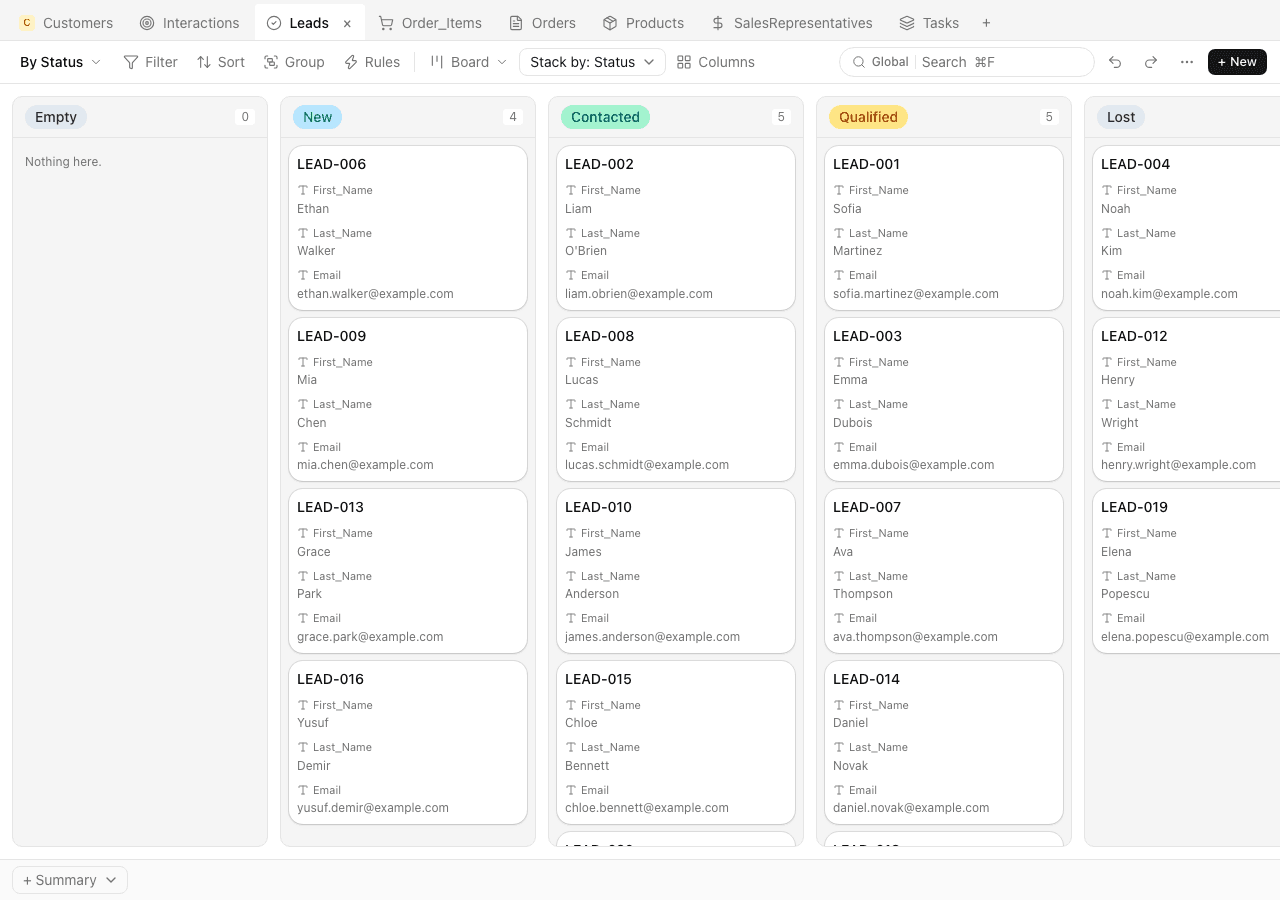
Grid, board, calendar, gallery, chart. They all read the same rows, so switching never copies anything.
Templates
Start from something that already works
Sales, hiring, stock or projects. Each one arrives with sample data, and you can change any of it in plain words.
| Dealprimary | Stage | Contact | Value | |
|---|---|---|---|---|
| VisionQuest RFQ | Discovery | James Cooper | $14,300 | |
| Acetube inquiry | Negotiation | Charlotte King | $48,200 | |
| Halden & Roe pilot | Proposal | Ava Thompson | $22,800 | |
| LKS retainer | Discovery | Benjamin Taylor | $6,500 | |
| Blue Harbour renewal | Closed won | Marcus Okafor | $37,150 | |
| Timbershadow expansion | Closed won | Casey Park | $61,540 |
Speed
Small enough to open, quick enough to forget
It opens before you have finished reaching for it, and an edit lands as fast as you type. Nothing is fetched from anywhere while you work.
Measured on a MacBook, on a table of 10,000 rows and 6 columns.
From cold to open
Edit a cell
Read a thousand rows
Requests to anywhere else
Your agent stops paying to look around
It asks for the rows and columns it needs and gets a summary back, instead of pulling a whole table into the conversation. A question about a big table costs about what a question about a small one costs.
Nothing in it you did not ask for
No telemetry, no auto-update, no plugin store, no account needed to open a file. What it deliberately leaves out is written down, so you can check.
Pricing
Free while it is just you
Everything on this page works without paying, up to 500 MCP calls a week. Pro removes that limit and takes larger attachments.
Free
For one person
- 500 MCP calls a week
- Attachments up to 25 MB
- Everything runs on your own machine
- As many workspaces and tables as you like
- Full history, and undo that goes back
- Connect Claude, Codex or OpenCode
Pro
When you use it every day
- MCP calls with no limit
- Attachments up to 100 MB
- Everything in Free
- Email support
Billed through Polar. Cancel whenever you like, and your data stays on your machine either way.